Summary
This post documents where I ended up after about four months of wandering since writing my previous article, Creating a Blog Site with Hugo: Background.
Basic Architecture
| Service | Gen 1 | Gen 2 | Gen 3 | Gen 4 |
|---|---|---|---|---|
| Domain Registrar | MuuMuu Domain | MuuMuu Domain | MuuMuu Domain | Cloudflare Registrar |
| Public DNS | No-IP.com | No-IP.com | No-IP.com | Cloudflare DNS |
| Blog System | tDiary | WordPress | Hugo | Hugo |
| Web Hosting | Home server (physical) | Home server (VM) | Netlify | Cloudflare Pages |
| Build Repository | — | — | GitHub | GitHub |
History
Generation 1
- Created “yamk Diary” using tDiary on a home Linux server
- Used No-IP dynamic IP service + personal domain to stay unaffected by ISP changes and moves
- Being a CMS, it struggled under high load
Being able to write articles directly in the browser was innovative and convenient.
Generation 2
- Switched to WordPress-based “yamk blog” on a home Linux server
- Later wiped out by an HDD failure
WordPress let me freely check layouts and upload images in the browser. Comment spam was a constant headache given WordPress’s widespread use. Paid spam-prevention services existed, but felt counterproductive. PHP tuning was also a pain.
Generation 3 (June 2020 – September 2024)
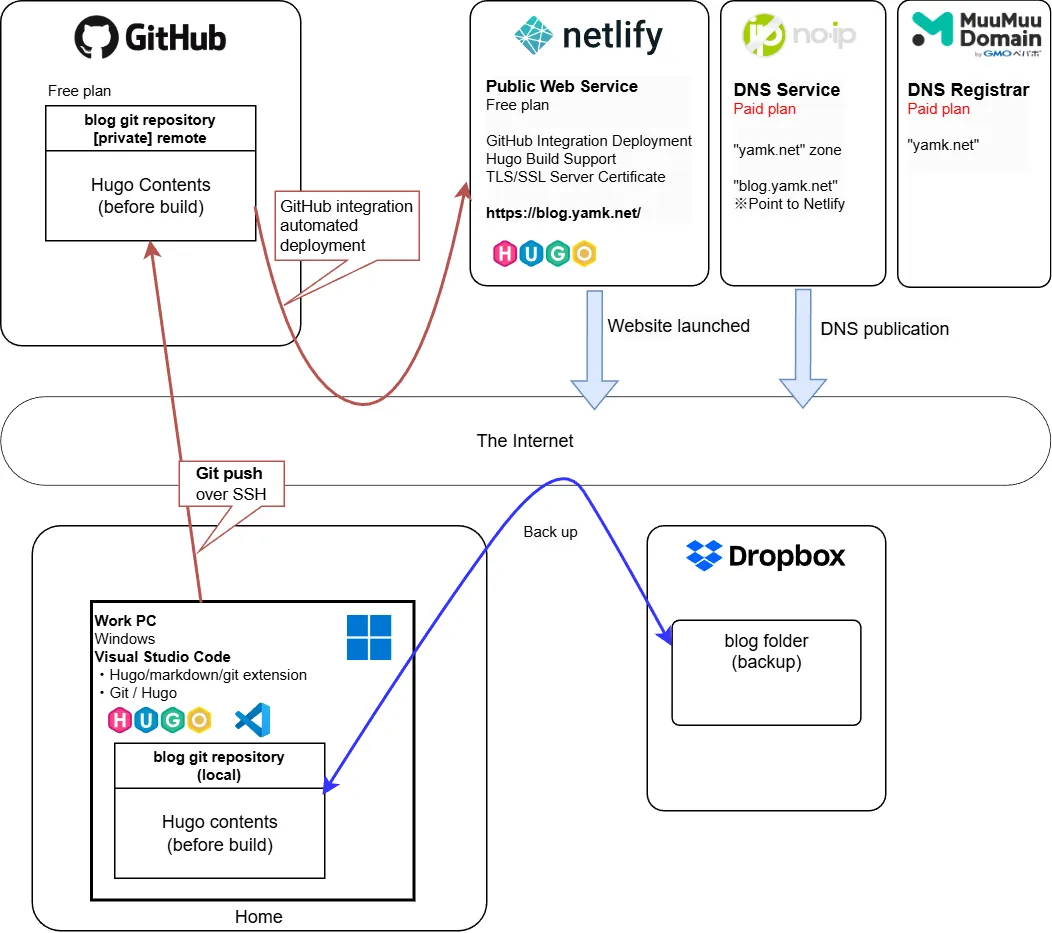
- Writing done on a home Windows PC
- Entire article folder backed up with Dropbox
- Article preview and adjustment done with local HUGO.EXE
- After finishing, pushed to GitHub repository
- Site published on Netlify
- GitHub integration downloads the Hugo repository to Netlify, builds with Hugo, and auto-publishes
Migrated to Hugo, a Markdown-based SSG where articles are durable and preserved for the future. Writing is harder, but the advantages outweigh that.
Generation 4 (September 2024–)
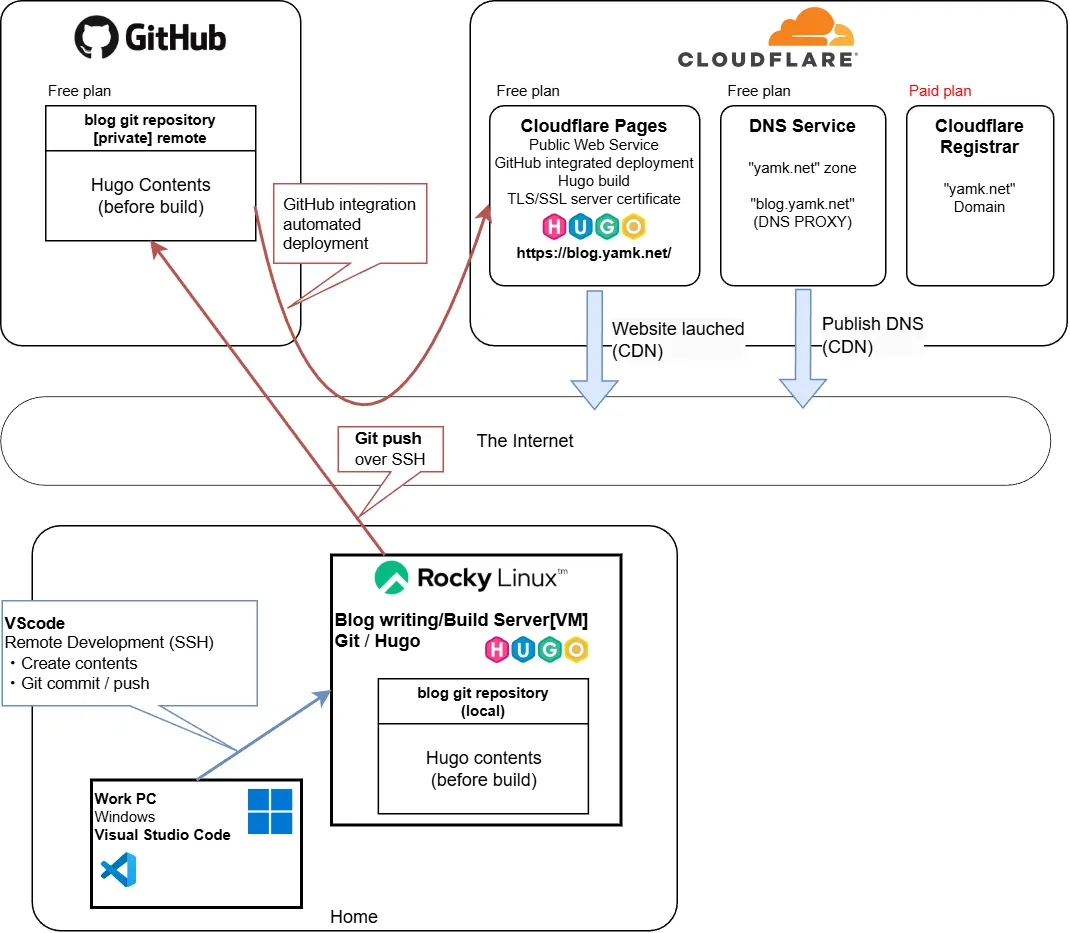
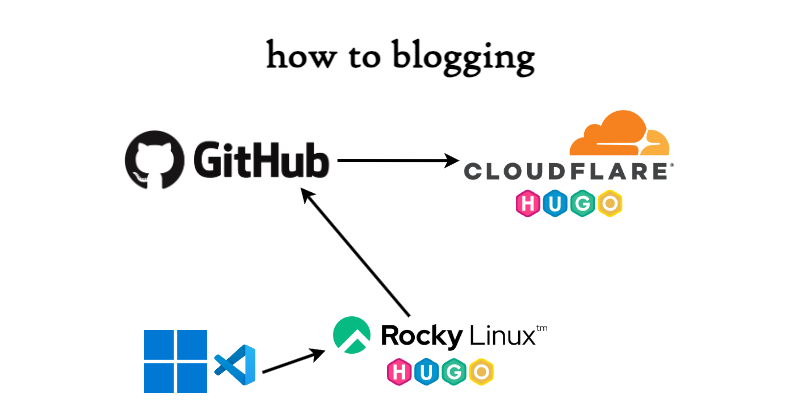
- A dedicated Linux server (home VM) serves as the master for writing and building
- Articles are edited remotely from a home Windows PC via Visual Studio Code’s Remote Development extension
- Article preview is done by running
hugo serveron the writing/build server and viewing it in a browser on the work PC - After finishing, pushed from the writing/build server to GitHub
- Can be pushed remotely via Windows VSCode
- Site published on Cloudflare Pages
- GitHub integration downloads the Hugo repository to Cloudflare, builds with Hugo, and auto-publishes
The weak yen caused no-ip.com and MuuMuu Domain to creep up in price. MuuMuu Domain in particular started charging a “service maintenance adjustment fee” — essentially a unilateral price hike, possibly due to the GMO acquisition.
There were too many service contracts tied to the blog, so I sold my soul to consolidated everything with Cloudflare.
Changes from Gen 3 → Gen 4
- Consolidated multiple services down to just GitHub and Cloudflare
- Eliminated the opaque “service maintenance adjustment fee” and saved a little on annual domain renewal
- Public DNS service became free
- By separating article mastering and preview to the Linux server side, the writing environment is preserved even if a PC becomes unstable
- Article backup is safe on GitHub
- Stopped using Dropbox after files started rolling back due to using git and Dropbox simultaneously across two PCs
- The writing PC only needs VSCode installed, so it can be shared across multiple PCs
- Cloudflare DNS is blazing fast
- Cloudflare is a CDN, so the site is copied worldwide and accessed from the geographically nearest location
- Cloudflare Pages supports HTTP/3 (QUIC) for blazing fast speeds
The result is that I may have sold my soul to Cloudflare… but with IPv4 exhaustion making home server publishing increasingly difficult, there’s no choice but to hop between affordable, high-quality services. Fortunately, with an SSG (static site generator), web publishing costs stay low. The writing barrier is higher than WordPress, but I think it’s better suited for long-term personal note preservation.