Summary
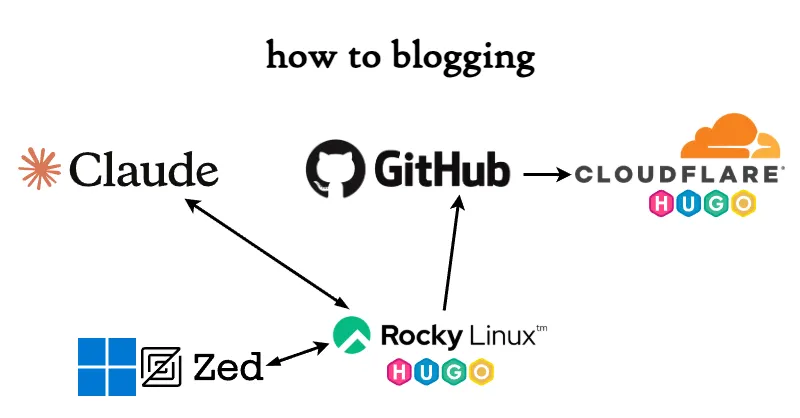
In March 2026, I started experimenting with AI-assisted blog writing using Claude AI, and the workflow changed so dramatically that I decided to document it.
Basic Setup
Continuing from my previous article My Blog Setup (January 2025), I’ll call this current setup the 5th generation and compare them side by side.
| Component | 4th Generation | 5th Generation |
|---|---|---|
| Domain registrar | Cloudflare Registrar | Cloudflare Registrar |
| Public DNS | Cloudflare DNS | Cloudflare DNS |
| Blog system | Hugo | Hugo |
| Web hosting | Cloudflare Pages | Cloudflare Pages |
| Build repository | GitHub | GitHub |
| Writing machine | Windows PC | Windows PC |
| Build & test machine | Rocky Linux VM | Rocky Linux VM |
| Editor | Microsoft VS Code | Zed Editor |
| Author | 100% human | Human + Claude AI ~85% |
| AI environment | — | Claude Code (Zed Extension) |
Evolution (continued)
5th Generation (March 2026 –)
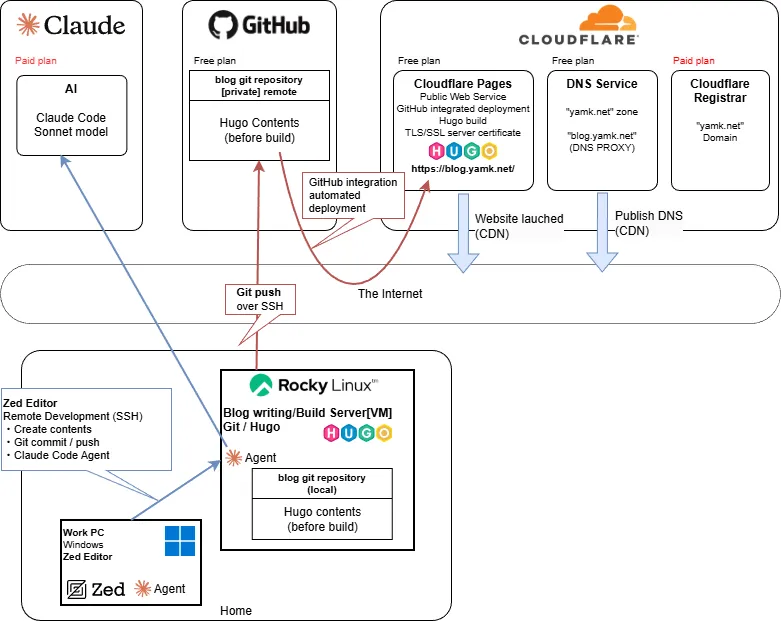
- Adopted an AI-assisted writing style using the Claude AI Pro plan.
- Switched to Zed Editor to go along with the AI integration.
- The Windows version of Zed had its official release in autumn 2025 and has been improving rapidly since.
- Writing workflow with Zed + Claude Agent (Claude Code):
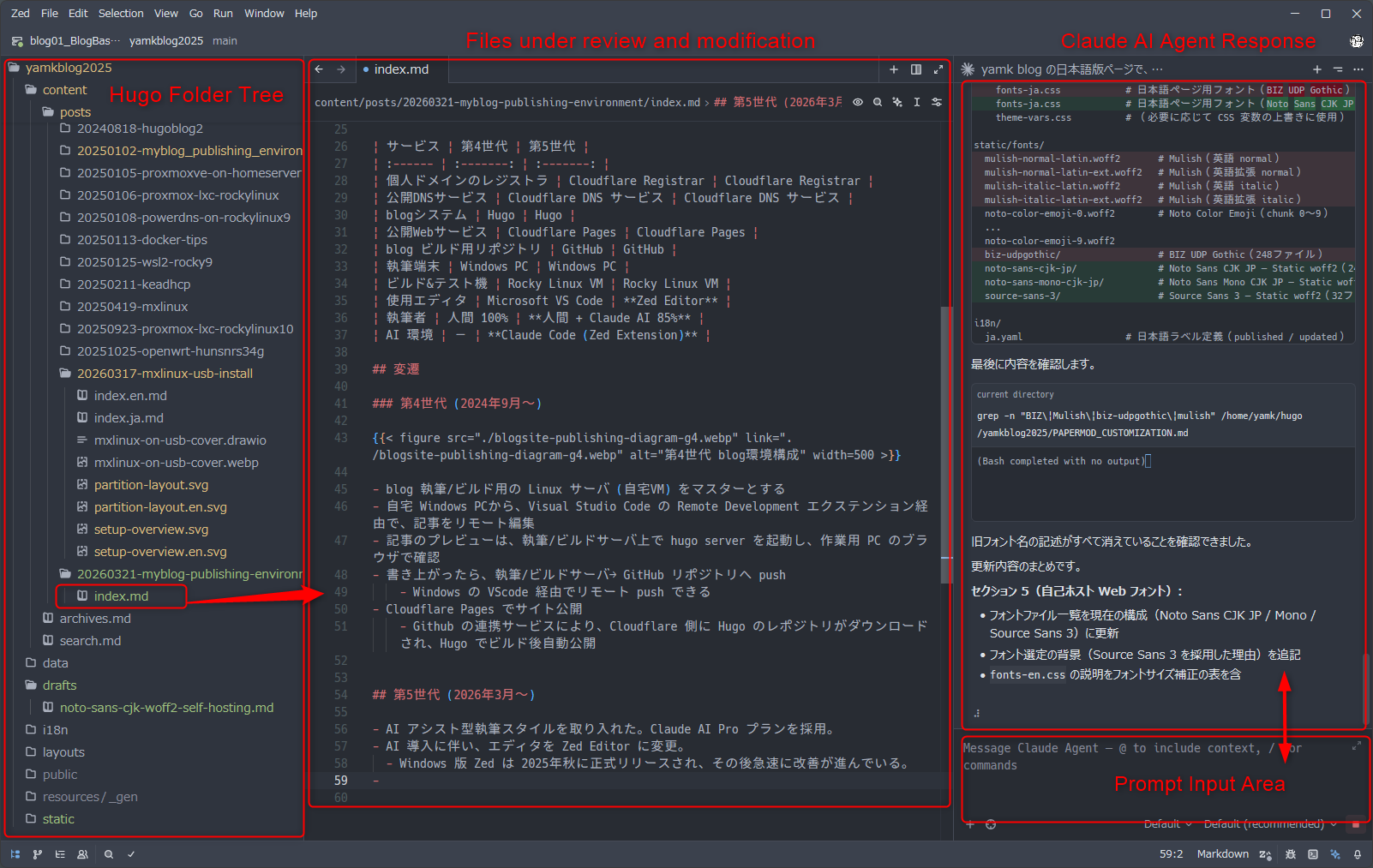
AI-Assisted Writing Workflow
How the writing process works
- I describe roughly what I want to write or the steps I want to document, tell Claude to turn it into an article, and it generates the skeleton and procedures as a Hugo-formatted
index.md. - Since Claude AI Agent edits files directly, there’s no copy-pasting from a chat window at all.
- When hands-on verification is needed, I check it myself and point out any discrepancies between the article and reality within the chat, then have Claude fix them.
- After every change, Claude runs a Hugo build to check for errors and fixes any it finds itself, so file structure corruption from edits is essentially unheard of.
- After each change, I preview the result in the local Hugo Server and review the content myself.
- If corrections are needed, I either continue giving instructions to Claude in chat or edit the file directly.
Example Incantations
Since the entire Hugo folder is set as the project directory, Claude can handle instructions like these:
| Incantation | Response |
|---|---|
| Increase the H2 heading font size slightly | CSS change for font face / size |
| Reduce the padding inside each table cell | Table design CSS change |
| Tighten the line spacing in bullet lists a bit | CSS spacing adjustment for various layouts |
| Create a shortcode for callout/info box sections | New Hugo shortcode developed and implemented |
| Turn the content from section ○○ into an SVG diagram and insert it at the top of that section | SVG illustration created and figure shortcode written |
| Lower all heading levels by one across all articles (# → ##) | All documents reviewed; Markdown structure and headings corrected |
| (After a Hugo update warning) Find the cause of the deprecation warning and fix it. The release notes URL is ○○. | Hugo documentation referenced, config file updated correctly; notes on future upgrade considerations also output |
| Save a summary of today’s changes as a Markdown file | Very clear and readable documentation output |
| Write the commit message in English summarizing everything, then commit & push | git stage → English commit message → GitHub push |
As you can see, anything that can be done by editing files in the project folder can be handled entirely through conversation.
Division of Roles in AI-Assisted Writing
For now, the division of labor looks roughly like this:
| Party | Role | Specific tasks |
|---|---|---|
| Human | Planner / Editor / Real-world verifier | Content planning Setting direction Abstract and concrete instructions Fact-checking against reality Final sign-off |
| AI | Writer / Editorial assistant | Drafting actual documents Translating abstract instructions into concrete edits Presenting and executing revision options Git commit and push |
The tasks that used to require the most hands-on effort — looking up Markdown syntax, writing image shortcodes, tweaking CSS — are now offloaded to AI, freeing me to focus on overall structure and content decisions.
There seems to be a trend of people “dumping everything on AI and skipping verification entirely,” but I believe that even in the age of AI, humans must retain final responsibility.
Creating Translated Versions
For this blog, I used Hugo’s multilingual feature and had Claude AI produce English versions of several articles.
“Please create an English version of the article in folder ○○.”
That’s essentially all it takes.
Admittedly, translation is one area where I do lean heavily on AI, so I apologize in advance for any mistranslations. The one thing I (the human) put effort into was recreating the diagrams in English where possible. Re-taking screenshots from a Japanese-language Windows environment in English is difficult (and tedious), so some remain as-is. Translated articles do include a note indicating that AI was used.
Closing
If you have any feedback or corrections, feel free to send me a Bluesky DM. I’ll quietly take care of it.