My Blog Setup (March 2026)
Table of Contents
Summary #
In March 2026, I started experimenting with AI-assisted blog writing using Claude AI, and the workflow changed so dramatically that I decided to document it.
Basic Setup #
Continuing from my previous article My Blog Setup (January 2025), I’ll call this current setup the 5th generation and compare them side by side.
| Component | 4th Generation | 5th Generation |
|---|---|---|
| Domain registrar | Cloudflare Registrar | Cloudflare Registrar |
| Public DNS | Cloudflare DNS | Cloudflare DNS |
| Blog system | Hugo | Hugo |
| Web hosting | Cloudflare Pages | Cloudflare Pages |
| Build repository | GitHub | GitHub |
| Writing machine | Windows PC | Windows PC |
| Build & test machine | Rocky Linux VM | Rocky Linux VM |
| Editor | Microsoft VS Code | Zed Editor |
| Author | 100% human | Human + Claude AI ~85% |
| AI environment | — | Claude Code (Zed Extension) |
Evolution (continued) #
5th Generation (March 2026 –) #
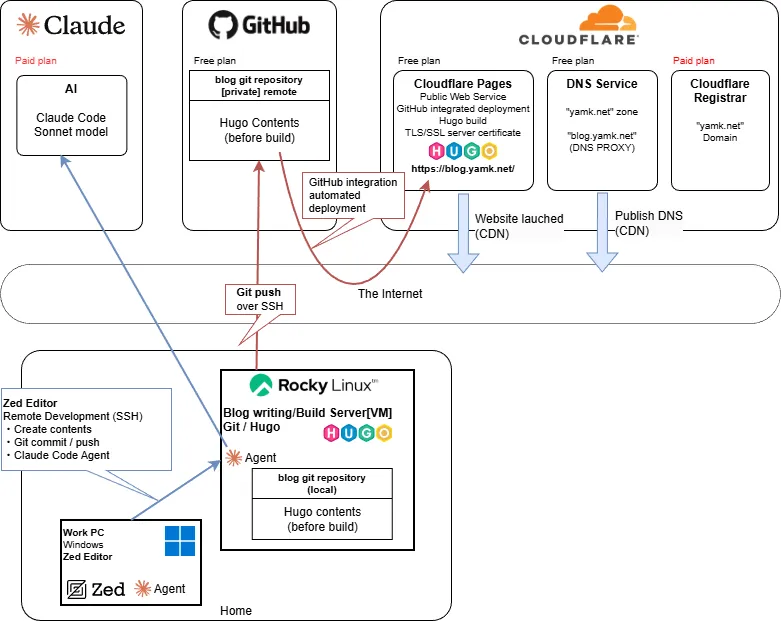
- Adopted an AI-assisted writing style using the Claude AI Pro plan.
- Switched to Zed Editor to go along with the AI integration.
- The Windows version of Zed had its official release in autumn 2025 and has been improving rapidly since.
- Writing workflow with Zed + Claude Agent (Claude Code):
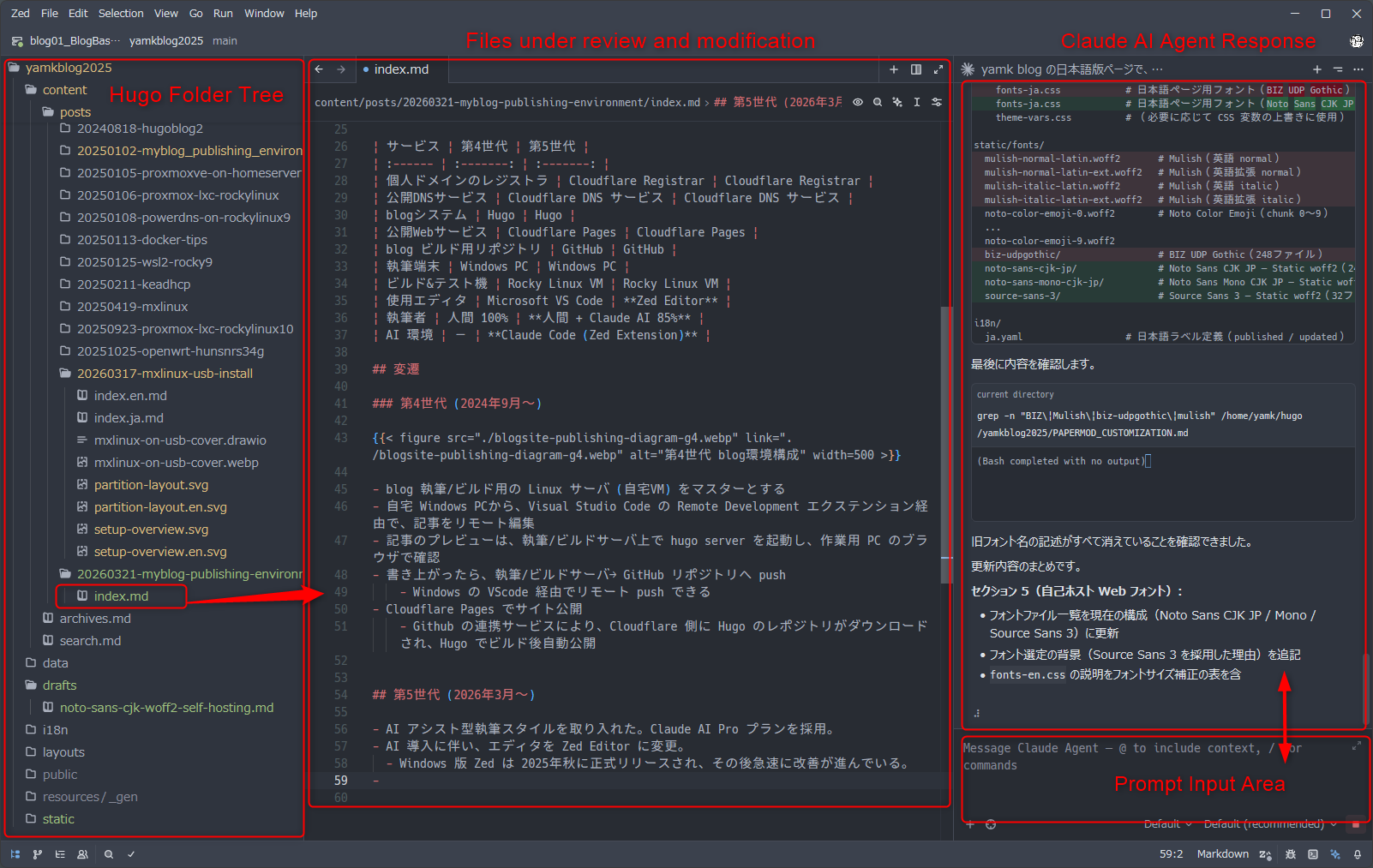
AI-Assisted Writing Workflow #
How the writing process works #
- I describe roughly what I want to write or the steps I want to document, tell Claude to turn it into an article, and it generates the skeleton and procedures as a Hugo-formatted
index.md. - Since Claude AI Agent edits files directly, there’s no copy-pasting from a chat window at all.
- When hands-on verification is needed, I check it myself and point out any discrepancies between the article and reality within the chat, then have Claude fix them.
- After every change, Claude runs a Hugo build to check for errors and fixes any it finds itself, so file structure corruption from edits is essentially unheard of.
- After each change, I preview the result in the local Hugo Server and review the content myself.
- If corrections are needed, I either continue giving instructions to Claude in chat or edit the file directly.
Example Incantations #
Since the entire Hugo folder is set as the project directory, Claude can handle instructions like these:
| Incantation | Response |
|---|---|
| Increase the H2 heading font size slightly | CSS change for font face / size |
| Reduce the padding inside each table cell | Table design CSS change |
| Tighten the line spacing in bullet lists a bit | CSS spacing adjustment for various layouts |
| Create a shortcode for callout/info box sections | New Hugo shortcode developed and implemented |
| Turn the content from section ○○ into an SVG diagram and insert it at the top of that section | SVG illustration created and figure shortcode written |
| Lower all heading levels by one across all articles (# → ##) | All documents reviewed; Markdown structure and headings corrected |
| (After a Hugo update warning) Find the cause of the deprecation warning and fix it. The release notes URL is ○○. | Hugo documentation referenced, config file updated correctly; notes on future upgrade considerations also output |
| Save a summary of today’s changes as a Markdown file | Very clear and readable documentation output |
| Write the commit message in English summarizing everything, then commit & push | git stage → English commit message → GitHub push |
As you can see, anything that can be done by editing files in the project folder can be handled entirely through conversation.
Division of Roles in AI-Assisted Writing #
For now, the division of labor looks roughly like this:
| Party | Role | Specific tasks |
|---|---|---|
| Human | Planner / Editor / Real-world verifier | Content planning Setting direction Abstract and concrete instructions Fact-checking against reality Final sign-off |
| AI | Writer / Editorial assistant | Drafting actual documents Translating abstract instructions into concrete edits Presenting and executing revision options Git commit and push |
The tasks that used to require the most hands-on effort — looking up Markdown syntax, writing image shortcodes, tweaking CSS — are now offloaded to AI, freeing me to focus on overall structure and content decisions.
There seems to be a trend of people “dumping everything on AI and skipping verification entirely,” but I believe that even in the age of AI, humans must retain final responsibility.
Creating Translated Versions #
For this blog, I used Hugo’s multilingual feature and had Claude AI produce English versions of several articles.
“Please create an English version of the article in folder ○○.”
That’s essentially all it takes.
Admittedly, translation is one area where I do lean heavily on AI, so I apologize in advance for any mistranslations. The one thing I (the human) put effort into was recreating the diagrams in English where possible. Re-taking screenshots from a Japanese-language Windows environment in English is difficult (and tedious), so some remain as-is. Translated articles do include a note indicating that AI was used.
Closing #
If you have any feedback or corrections, feel free to send me a Bluesky DM. I’ll quietly take care of it.