Building a Home DNS Server with PowerDNS (Rocky Linux 10 Edition)

Table of Contents
Introduction #
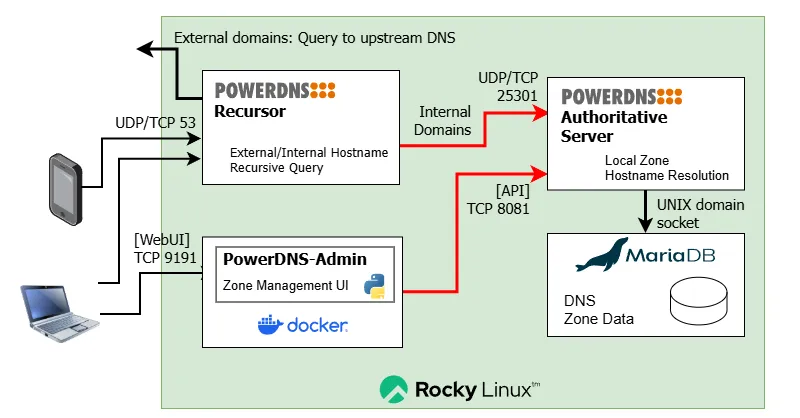
This article is an updated version of Building a Home DNS Server with PowerDNS. It describes the procedure for building a home DNS server on Rocky Linux 10 using the PowerDNS package suite (with some configuration changes from the previous setup).
Home DNS Server Configuration #
This article builds the following configuration:
| Item | Setting |
|---|---|
| Hardware | Virtual environment with Proxmox VE already installed |
| OS | Rocky Linux 10 (LXC container) |
| Memory | 2GB |
| Storage | 20GB |
| DNS Authoritative Server | PowerDNS Authoritative Server |
| DNS Resolver | PowerDNS Recursor |
| DNS Backend DB | MariaDB |
| WebUI for DNS Authoritative Server | PowerDNS-Admin (Docker) |
The previous article included PowerDNS DNSdist, but since basic domain routing is also possible with Recursor alone, it has been removed from this configuration.
DNS Server Architecture #
Setup Procedure #
Configuration Parameters #
Collect all configuration values upfront. Replace the values in the scripts below to match your own environment.
| System | Item | Setting |
|---|---|---|
| DNS Server | Hostname | dns01 |
| DNS Server | IPv4 Address | 192.0.2.50/24 |
| DNS Server | IPv4 Default Gateway | 192.0.2.1 |
| DNS Server | IPv6 Address | 2001:DB8::32/64 |
| DNS Server | IPv6 Default Gateway | 2001:DB8::1/64 |
| DNS Server | Upstream DNS Forwarder | 1.1.1.1 1.0.0.1 2606:4700:4700::1111 2606:4700:4700::1001 |
| MariaDB | Version | 11.8 (LTS) — Support ends: 2033-10-22 |
| MariaDB | root password | 6g8nS9QSC5HDhdbx |
| MariaDB | pdnsadmin user password | 3mwH1QeuiMV53157 |
| PowerDNS Authoritative Server | Version | 5.0.x |
| PowerDNS Authoritative Server | DNS Listen Port | UDP/TCP 25301 |
| PowerDNS Authoritative Server | API KEY | faa5b1ce-1495-4fce-9129-735078a675f2 |
| PowerDNS Authoritative Server | API Listen port | 8081 |
| PowerDNS Recursor | Version | 5.4.x |
| PowerDNS Recursor | Listen Port | UDP/TCP 53 |
| PowerDNS-Admin | Version | 0.4.2 |
| PowerDNS-Admin | Listen Port | TCP 9191 |
| DNS Zone | Zone name | home |
| DNS Zone | IPv4 segment | 192.0.2.0/24 |
| DNS Zone | IPv6 segment | 2001:DB8::/64 |
- IPv4/IPv6 addresses use documentation addresses per RFC 5737 / RFC 3849
- Passwords generated with develop.tools | Password Generator
- API keys generated with develop.tools | UUID Generator
- “Upstream DNS Forwarder” should be your ISP’s DNS IP or a public DNS
- The example uses Cloudflare IPv4/IPv6 addresses
MariaDB Installation #
dnf Repository Setup #
Example for MariaDB 11.8 LTS:
MARIADBVERSION=11.8
cat <<__EOT__> /etc/yum.repos.d/mariadb.repo
[mariadb]
name = MariaDB
baseurl = https://rpm.mariadb.org/${MARIADBVERSION}/rhel/\$releasever/\$basearch
gpgkey= https://rpm.mariadb.org/RPM-GPG-KEY-MariaDB
gpgcheck=1
__EOT__
Install
dnf install -y MariaDB-server
systemctl enable mariadb
systemctl start mariadb
MariaDB Initial Setup #
Initial security settings
mariadb-secure-installation
# mariadb-secure-installation↵
Enter current password for root (enter for none): ↵
Switch to unix_socket authentication [Y/n]  y↵
Change the root password? [Y/n] y↵
New password: 6g8nS9QSC5HDhdbx↵
Re-enter new password: 6g8nS9QSC5HDhdbx↵
Remove anonymous users? [Y/n] y↵
Disallow root login remotely? [Y/n] y↵
Remove test database and access to it? [Y/n] y↵
Reload privilege tables now? [Y/n] y↵
Log and Bind-Address Settings #
Edit /etc/my.cnf.d/server.cnf with vi
- Suppress excessive warning messages
- Restrict bind address to loopback only
[mysqld]
log_warnings = 1
bind-address = 127.0.0.1,::1
First MariaDB Login #
Enter the password when prompted
# mariadb -u root -p↵
Enter password: 6g8nS9QSC5HDhdbx↵
Welcome to the MariaDB monitor.  Commands end with ; or \g.
Your MariaDB connection id is 299
Server version: 11.8.7-MariaDB MariaDB Server

Copyright (c) 2000, 2018, Oracle, MariaDB Corporation Ab and others.

Type 'help;' or '\h' for help. Type '\c' to clear the current input statement.

MariaDB [(none)]>
Set up the PowerDNS user
CREATE DATABASE pdns;
GRANT ALL ON pdns.* TO pdnsadmin@localhost IDENTIFIED BY '3mwH1QeuiMV53157';
FLUSH PRIVILEGES;
Verify settings
SHOW GRANTS FOR pdnsadmin@localhost;
OK if the following is displayed
Grants for pdnsadmin@localhost
Exit with [Ctrl]-[D]
Installing PowerDNS Packages #
Repository Setup #
Reference: https://repo.powerdns.com/
Example for PowerDNS Authority 5.0 / PowerDNS Recursor 5.4:
PDNS_AUTH_VER=50
PDNS_RECURSOR_VER=54
curl -o /etc/yum.repos.d/powerdns-auth-${PDNS_AUTH_VER}.repo https://repo.powerdns.com/repo-files/el-auth-${PDNS_AUTH_VER}.repo
curl -o /etc/yum.repos.d/powerdns-rec-${PDNS_RECURSOR_VER}.repo https://repo.powerdns.com/repo-files/el-rec-${PDNS_RECURSOR_VER}.repo
Package Installation #
dnf install -y pdns pdns-backend-mysql pdns-recursor
MariaDB Setup for PowerDNS #
Enter the DB password when prompted:
mariadb -u pdnsadmin -p pdns < /usr/share/doc/pdns-backend-mysql/schema.mysql.sql
Enter password:
PowerDNS Auth (Authoritative Server) / Recursor Configuration #
Back up the original PDNS Auth configuration:
cp -a /etc/pdns/pdns.conf /etc/pdns/pdns.conf.DEFAULT
PDNS_AUTH_BASE='/etc/pdns'
PDNS_RECURSOR_BASE='/etc/pdns-recursor'
PDNS_RECURSOR_IPV4_ACL='192.0.2.0/24'
PDNS_RECURSOR_IPV6_ACL='2001:DB8::/64'
PDNS_RECURSOR_LOCAL_ZONE='home'
PDNS_RECURSOR_LOCAL_PTRZONEV4='2.0.192.in-addr.arpa'
# IPv6 reverse lookup zone
PDNS_RECURSOR_LOCAL_PTRZONEV6='0.0.0.0.0.0.0.0.8.b.d.0.1.0.0.2.ip6.arpa'
# Generated with a UUID generator tool
PDNS_AUTH_APIKEY='faa5b1ce-1495-4fce-9129-735078a675f2'
MARIADB_PASSWORD='3mwH1QeuiMV53157'
# For Cloudflare
UPSTREAM_DNS_IPv4_1=1.1.1.1
UPSTREAM_DNS_IPv4_2=1.0.0.1
UPSTREAM_DNS_IPv6_1=2606:4700:4700::1111
UPSTREAM_DNS_IPv6_2=2606:4700:4700::1001

# PDNS Auth config
cat <<__EOT__ >${PDNS_AUTH_BASE}/pdns.conf
api=yes
api-key=${PDNS_AUTH_APIKEY}
webserver=yes
webserver-address=0.0.0.0
# Enable access from Docker bridge network
webserver-allow-from=127.0.0.0/8,172.29.0.0/16
webserver-port=8081
launch=gmysql
gmysql-socket=/var/lib/mysql/mysql.sock
gmysql-user=pdnsadmin
gmysql-password=${MARIADB_PASSWORD}
gmysql-dbname=pdns
local-address=127.0.0.1 ::1
local-port=25301
security-poll-suffix=
setgid=pdns
setuid=pdns
# log-dns-details=yes
# log-dns-queries=yes
log-timestamp=yes
# logging-facility=0
# loglevel=7
dnsupdate=yes
allow-dnsupdate-from="127.0.0.0/8, ::1/128"
__EOT__
chgrp pdns ${PDNS_AUTH_BASE}/pdns.conf
chmod 640 ${PDNS_AUTH_BASE}/pdns.conf

# PDNS Recursor config (YAML format)

cat <<__EOT__ >${PDNS_RECURSOR_BASE}/recursor.d/recursor.yml
incoming:
  listen:
    - 0.0.0.0
    - ::
  allow_from:
    - 127.0.0.0/8
    - "${PDNS_RECURSOR_IPV4_ACL}"
    - '::1/128'
    - "${PDNS_RECURSOR_IPV6_ACL}"
  tcp_fast_open: 100
outgoing:
  tcp_fast_open_connect: true
  source_address:
    - 0.0.0.0
    - '::'
recursor:
  extended_resolution_errors: true
  serve_rfc1918: false
  hint_file: no-refresh
  forward_zones:
    - zone: '${PDNS_RECURSOR_LOCAL_ZONE}'
      forwarders:
        - '127.0.0.1:25301'
    - zone: '${PDNS_RECURSOR_LOCAL_PTRZONEV4}'
      forwarders:
        - '127.0.0.1:25301'
    # IPv6 reverse lookup zone
    - zone: '${PDNS_RECURSOR_LOCAL_PTRZONEV6}'
      forwarders:
        - '[::1]:25301'
  forward_zones_recurse:
    - zone: .
      forwarders:
        - ${UPSTREAM_DNS_IPv4_1}
        - ${UPSTREAM_DNS_IPv4_2}
        - ${UPSTREAM_DNS_IPv6_1}
        - ${UPSTREAM_DNS_IPv6_2}
  security_poll_suffix: ''
dnssec:
  negative_trustanchors:
    - name: '${PDNS_RECURSOR_LOCAL_ZONE}'
      reason: 'private zone'
    - name: '${PDNS_RECURSOR_LOCAL_PTRZONEV4}'
      reason: 'private ptr zone'
    # IPv6 reverse lookup zone (NTA)
    - name: '${PDNS_RECURSOR_LOCAL_PTRZONEV6}'
      reason: 'private ptr zone'
logging:
  loglevel: 4
  # common_errors: true
  # quiet: false
  timestamp: true
  # trace: false
__EOT__

# rsyslog log routing

echo "Creating syslog configuration:"
mkdir -p /var/log/powerdns
chmod 755 /var/log/powerdns
cat <<'__EOT__' > /etc/rsyslog.d/powerdns.conf
$template PowerDNSLogs, "/var/log/powerdns/%programname%.log"

if $programname contains 'pdns-recursor' then -?PowerDNSLogs
& stop

if $programname contains 'pdns_server' then -?PowerDNSLogs
& stop
__EOT__

echo "Creating logrotate configuration:"
cat <<__EOT__ > /etc/logrotate.d/powerdns
/var/log/powerdns/*.log
{
    missingok
    sharedscripts
    postrotate
        /usr/bin/systemctl -s HUP kill rsyslog.service >/dev/null 2>&1 || true
    endscript
}
__EOT__

systemctl reload rsyslog.service
systemctl enable pdns-recursor.service
systemctl restart pdns-recursor.service
systemctl enable pdns.service
systemctl restart pdns.service
An NTA is a mechanism that disables DNSSEC validation for specific zones. (RFC 7646)
DNSSEC detects DNS response tampering via digital signatures, and relies on an unbroken “Chain of Trust” from the root zone (.) down to the target domain. If the chain is broken, the resolver discards the response as SERVFAIL.
Private zones created for home use (such as home and reverse lookup zones) do not exist in the global DNS, so there are no DS records reachable from the root — no chain of trust exists. As a result, if PowerDNS Recursor applies its default DNSSEC validation, all queries to local zones will return SERVFAIL.
By registering a zone as an NTA, you explicitly tell the Recursor “DNSSEC validation is not required for this zone,” allowing local name resolution to work correctly.
Note: As of Recursor 5.0, NTAs can be specified directly in recursor.yml, so a separate nta.lua file is no longer needed.
Zone Registration Example for PowerDNS Authoritative Server #
Register zone data using the pdnsutil command for initial testing.
Note that the pdnsutil command syntax changed between versions 4.9 and 5.0.
- PowerDNS Manual: pdnsutil
- pdnsutil syntax and behaviour changes, PowerDNS Upgrade Notes: 4.9.0 to 5.0.0
ZONE="home"
PTR_ZONE="2.0.192.in-addr.arpa"
SOA_MASTER="dns01.${ZONE}."
SOA_CONTACT="hostmaster.${ZONE}."
SOA_SERIAL=0
SOA_REFRESH=28800 # 8 hours
SOA_RETRY=3600 # 1 hour
SOA_EXPIRE=2419200 # 28 days
SOA_NEGATIVE=900 # 15 minutes
SOA_RECORD="${SOA_MASTER} ${SOA_CONTACT} ${SOA_SERIAL} ${SOA_REFRESH} ${SOA_RETRY} ${SOA_EXPIRE} ${SOA_NEGATIVE}"

# clear zone
pdnsutil zone delete "${ZONE}"
pdnsutil zone delete "${PTR_ZONE}"

## SAMPLE ZONE ENTRY ##
# Create Forward lookup zone
pdnsutil zone create "${ZONE}"
pdnsutil zone set-kind "${ZONE}" native
pdnsutil rrset replace "${ZONE}" @ SOA "${SOA_RECORD}"
pdnsutil rrset add "${ZONE}" @ NS dns01.${ZONE}.

# Register DNS server itself (forward lookup)
pdnsutil rrset add "${ZONE}" dns01 A 192.0.2.50
pdnsutil rrset add "${ZONE}" dns01 AAAA '2001:DB8::32'

# Create Reverse lookup zone
pdnsutil zone create "${PTR_ZONE}"
pdnsutil zone set-kind "${PTR_ZONE}" native
pdnsutil rrset replace "${PTR_ZONE}" @ SOA "${SOA_RECORD}"
pdnsutil rrset add "${PTR_ZONE}" @ NS dns01.${ZONE}.

# Register DNS server itself (reverse lookup)
pdnsutil rrset add "${PTR_ZONE}" 50 PTR dns01.home.
Adding the PowerDNS WebUI #
Install Docker Engine #
dnf config-manager --add-repo https://download.docker.com/linux/centos/docker-ce.repo
dnf install -y docker-ce docker-compose-plugin
# Change default bridge network address pool
cat <<'__EOT__' >/etc/docker/daemon.json
{
    "default-address-pools":[
        {
            "base":"172.29.0.0/16",
            "size":24
        }
    ]
}
__EOT__
# start dockerd
systemctl enable docker.service
systemctl start docker.service
Deploy PowerDNS-Admin (Docker) #
Paste the previously created PowerDNS Authoritative Server API key.
docker run -d \
    -e SECRET_KEY='faa5b1ce-1495-4fce-9129-735078a675f2' \
    -v pda-data:/data \
    -p 9191:80 \
    --restart always \
    powerdnsadmin/pda-legacy:latest
firewalld Configuration #
If using firewalld, add rules to open the following ports:
| Port | Protocol | Process | Purpose | Policy |
|---|---|---|---|---|
| 53 | TCP/UDP | pdns-recursor | DNS (LAN-limited via allow_from) | Allow from LAN |
| 9191 | TCP | docker-proxy | PowerDNS-Admin Web UI | Allow from LAN |
# Install if not already present
dnf install -y firewalld
systemctl enable --now firewalld

# Zone assignment
firewall-cmd --permanent --zone=internal --add-interface=eth0
firewall-cmd --permanent --zone=trusted  --add-interface=docker0

# internal zone (LAN-facing) allow rules
firewall-cmd --permanent --zone=internal --add-service=dns
firewall-cmd --permanent --zone=internal --add-port=9191/tcp

firewall-cmd --reload
PowerDNS-Admin Initial Setup #
Access via browser: http://192.0.2.50:9191/
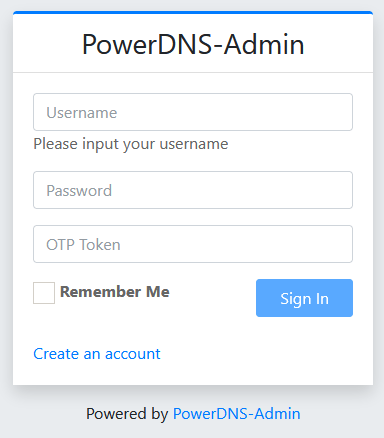
Register a user:
- Create an account
- First Name: FIRSTNAME
- Last Name: LASTNAME
- Email: [email protected]
- Username: xxxx
- Password: XXXXXXXXX
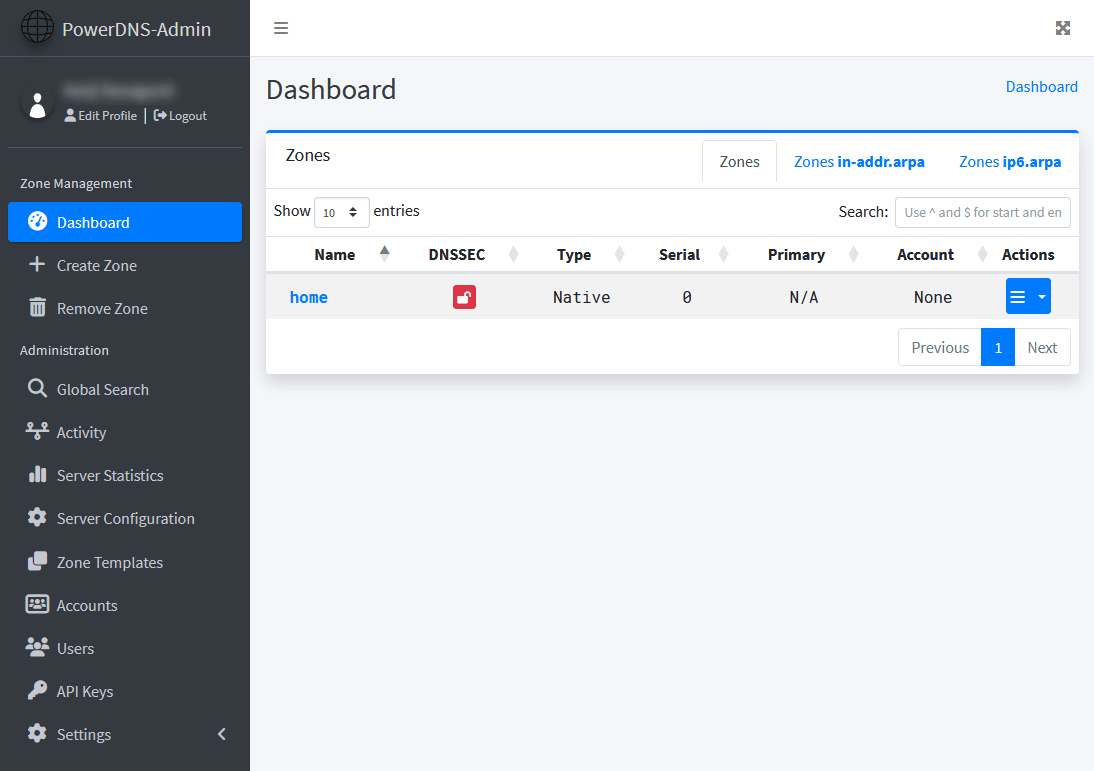
Configure in the WebUI ※ Note: the PowerDNS Authoritative Server IP as seen from inside Docker is the host itself via the docker0 bridge — specify the first IP of the docker0 bridge.
- PowerDNS API URL: http://172.29.0.1:8081/
- PowerDNS API Key: faa5b1ce-1495-4fce-9129-735078a675f2
Once configured, zone editing becomes available from the Web UI.
Verification #
Post-Reboot Service Check #
Check processes:
ps axuw | grep "pdns"
Confirm that pdns_server and pdns_recursor processes are running.
pdns         443  0.0  1.2 750864 26436 ?        SLsl May23   0:15 /usr/sbin/pdns_server --guardian=no --daemon=no --disable-syslog --log-timestamp=no --write-pid=no
pdns-re+  518848  0.0  1.3 421508 28728 ?        Ssl  12:03   0:00 /usr/sbin/pdns_recursor --daemon=no --write-pid=no --disable-syslog --log-timestamp=no
Check logs for errors:
less /var/log/powerdns/pdns_server.log
less /var/log/powerdns/pdns-recursor.log
External Query Test #
Test using the dig command on the server:
$ dig +noall +ans @localhost blog.yamk.net A↵
blog.yamk.net.          300     IN      A       104.21.21.177
blog.yamk.net.          300     IN      A       172.67.199.171
$ dig +noall +ans @localhost blog.yamk.net AAAA↵
blog.yamk.net.          300     IN      AAAA    2606:4700:3033::6815:15b1
blog.yamk.net.          300     IN      AAAA    2606:4700:3032::ac43:c7ab
Internal Query Test #
$ dig +noall +ans @localhost dns01.home A↵
dns01.home.             3600    IN      A       192.0.2.50
$ dig +noall +ans @localhost dns01.home AAAA↵
dns01.home. 3600 IN AAAA 2001:DB8::32$ dig +noall +ans @localhost -x 192.0.2.50↵
50.2.0.192.in-addr.arpa. 3600 IN PTR dns01.home.Query Test from a PC #
Test from Windows PowerShell on a client PC, specifying the DNS server.
The Resolve-DnsName cmdlet’s -Type A_AAAA option queries both IPv4 and IPv6 addresses at once.
External host:
PS> Resolve-DnsName -Name blog.yamk.net -Server 192.0.2.50 -Type A_AAAA↵
Name              Type   TTL   Section    IPAddress
----              ----   ---   -------    ---------
blog.yamk.net     AAAA   176   Answer     2606:4700:3033::6815:15b1
blog.yamk.net     AAAA   176   Answer     2606:4700:3032::ac43:c7ab
blog.yamk.net     A      99    Answer     172.67.199.171
blog.yamk.net     A      99    Answer     104.21.21.177
Internal host forward lookup:
PS> Resolve-DnsName -Name dns01.home -Server 192.0.2.50 -Type A_AAAA↵
Name              Type   TTL   Section    IPAddress
----              ----   ---   -------    ---------
dns01.home        AAAA   3600  Answer     2001:DB8::32
dns01.home        A      3600  Answer     192.0.2.50
Internal host reverse lookup:
PS> Resolve-DnsName -Name 192.0.2.50 -Server 192.0.2.50 -Type PTR↵
Name                        Type   TTL   Section    NameHost
----                        ----   ---   -------    --------
50.2.0.192.in-addr.arpa     PTR    3600  Answer     dns01.home
Final Steps #
After testing everything and confirming it works, update the DNS server address distributed by the home LAN’s DHCP server to point to the newly built DNS server. Keep the original DNS server as a fallback.
Example:
- Primary DNS Server: 192.0.2.50 — newly built DNS
- Secondary DNS Server: 192.0.2.1 — original DNS server (broadband router, etc.)
Once client devices start querying the new DNS server, run further tests to confirm stability.
Done.
Notes #
Having an independent DNS server rather than relying on the DNS built into a broadband router or home gateway makes the internet noticeably faster. If resources and maintenance costs allow, setting up a home DNS is highly recommended. Building it yourself won’t solve every problem, but there will always be something to gain.
That said, DNS knowledge is required, so be mindful not to cause trouble for upstream ISPs through careless operation.
Two Meanings of “Home DNS” #
There are mainly two things needed from a home (or small office) DNS server:
(1) DNS for External Internet Access #
DNS is always used when accessing external services — browsing the web, streaming apps, online games, cloud services, etc.
When a modern website is accessed from a PC or smartphone, a single page load involves complex back-and-forth across many domains — JavaScript, fonts, analytics, ads, and more.
Meanwhile, CDNs (Content Delivery Networks) like Akamai and Cloudflare, which have become widespread in recent years:
- Deploy content servers worldwide
- Return different host IPs on each query (redundancy + geographic optimization)
Because of this, DNS cache TTLs are short, meaning DNS requests fire frequently even for the same URL.
DNS caching and DNS proxy functionality is built into broadband routers and ISP-provided home gateways, but their configurability is limited and resolution performance is often mediocre — so faster DNS response times have a real, noticeable impact.
Also, with IPv6 becoming widespread, response data often exceeds the original DNS spec limit (512 bytes), so support for EDNS0 message size extension (rather than the slower TCP fallback) is desirable.
There have also been cases where broadband router DNS bugs caused unstable internet access.
(2) DNS for Local Servers #
Once you start running multiple Linux servers, you quickly want to access them by hostname.
Technologies like NBT (NetBIOS over TCP/IP), Apple Bonjour, LLMNR, and more recently mDNS automatically map hostnames to IP addresses within the same segment — but they only work within broadcast/multicast range. The moment you segment your network, hostnames on other segments become invisible.
In my case, I run virtual routers inside virtual environments to separate segments, and also access the home LAN from outside via OpenVPN — so being able to use clear, readable hostnames everywhere matters.
A server that maps “hostname + domain” directly to “IP address” is called an Authoritative Server. Broadband routers and home gateways often have a simplified version, but they’re not particularly user-friendly.
Since hostnames within a home network change over time, it’s helpful to have something easy to maintain via a web management interface.
Thoughts on PowerDNS #
- PowerDNS Recursor migrated its configuration to YAML with version 5.0 in January 2024, but as of May 2026, Authoritative Server still uses the legacy format.
- Performance aside, I wish a single brand would unify its configuration approach…
References #
- PowerDNS as an alternative to BIND Designet
- Why Can’t We Quit BIND? Q&A Internet Initiative Japan, Minoru Shimamura, 2016/6/24
- What is DNSSEC Japan Registry Services (JPRS)