Adding a Comment System to a Hugo Blog (giscus)

Table of Contents
The content and implementation in this article were developed and written with the assistance of Claude Code, and verified and revised by a human.
As mentioned in the article, a comment feature has been added to this blog. Anyone with a GitHub account can post — feel free to try it out.
Introduction #
This blog runs on Hugo + PaperMod, but it had no comment feature for a long time.
It’s the nature of static site generators that interactive features like comments must rely on external services. As I briefly mentioned in a previous article (Creating a Blog Site with Hugo: The Background Story), free comment services — Disqus being a prime example — show ads on their free tier and left a lot to be desired.
I recently came across giscus and decided to finally implement a comment feature.
giscus is a comment system that uses GitHub Discussions as its backend.
- Completely free, no ads — uses GitHub services directly with no intermediary layer
- Spam-resistant — posting requires a GitHub account, so bots and anonymous spam are kept out
- Open source — github.com/giscus/giscus
- Dark mode support — can follow the site’s color scheme
- Multilingual — Japanese UI is supported
Because it requires a GitHub account, it’s a particularly good fit for tech blogs.
1. Overview #
The following files are changed or added in this implementation.
| Type | Target | Description |
|---|---|---|
| GitHub | blog-comments repository (new) | Backend for Discussions |
| Hugo | layouts/partials/extend_footer.html (new) | Embed giscus script |
| Hugo | assets/css/extended/custom.css (append) | Width adjustment for comment section |
The blog’s GitHub source repository itself is not touched.
2. What It Looks Like #
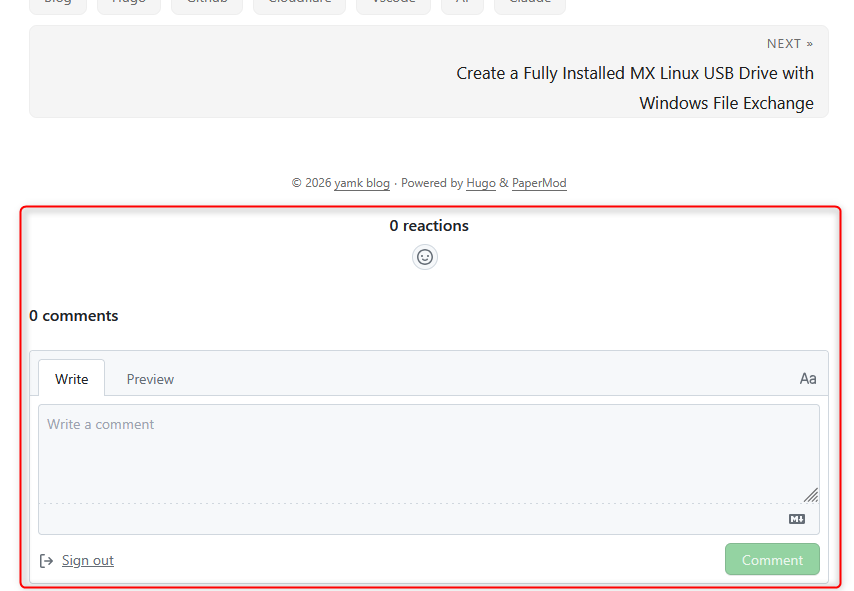
3. Preparing GitHub CLI #
If you haven’t installed GitHub CLI (gh), follow these steps to get it set up.
Installation
The installation method varies by OS.
# Windows (winget)
winget install GitHub.cli

# macOS (Homebrew)
brew install gh

# Linux (apt: Ubuntu / Debian-based)
sudo apt install gh

# Linux (dnf: Rocky / AlmaLinux / CentOS / RHEL-based)
sudo dnf config-manager --add-repo https://cli.github.com/packages/rpm/gh-cli.repo
sudo dnf install gh
For other installation methods, see the GitHub CLI official page.
Log in with your GitHub account
After installation, link your GitHub account with the following command.
gh auth loginFollow the interactive prompts. Select
GitHub.com→HTTPS→Login with a web browserto open a browser and complete authentication.Verify login
gh auth statusIf it shows
Logged in to github.com, you’re good to go.
4. Implementation Steps #
4-1. Create a dedicated comments repository on GitHub #
gh repo create blog-comments --public --description "Comments for your blog" --add-readme
gh api repos/YOUR_GITHUB_USERNAME/blog-comments --method PATCH --field has_discussions=true
4-2. Install the giscus app on your GitHub repository #
- Open github.com/apps/giscus
- Click the Install button
- Select the account to install it on (choose your personal account, not an Organization)
- Choose Only select repositories, select only
blog-comments, then click Install
blog-comments only.4-3. Retrieve giscus configuration parameters from GitHub #
Query via GraphQL.
gh api graphql -f query='
{
  repository(owner: "YOUR_GITHUB_USERNAME", name: "blog-comments") {
    id
    discussionCategories(first: 10) {
      nodes { id name }
    }
  }
}'
Example output:
{
  "data": {
    "repository": {
      "id": "R_kgDORxxxxxxxx",
      "discussionCategories": {
        "nodes": [
          { "id": "DIC_kwDORxxxxxxxxxxxxxxxx", "name": "Announcements" },
          { "id": "DIC_kwDORxxxxxxxxxxxxxxxx", "name": "General" },
          ...
        ]
      }
    }
  }
}
Note the repository id and the id of the Announcements category.
4-4. Create layouts/partials/extend_footer.html in your Hugo project #
Replace YOUR_GITHUB_USERNAME, R_kgDORxxxxxxxx, and DIC_kwDORxxxxxxxxxxxxxxxx with the actual values from step 3.
{{- if and .IsPage (ne (.Param "comments") false) }}
<div class="giscus-frame-container">
<script id="giscus-cfg"
        src="https://giscus.app/client.js"
        data-repo="YOUR_GITHUB_USERNAME/blog-comments"
        data-repo-id="R_kgDORxxxxxxxx"
        data-category="Announcements"
        data-category-id="DIC_kwDORxxxxxxxxxxxxxxxx"
        data-mapping="title"
        data-strict="1"
        data-reactions-enabled="1"
        data-emit-metadata="0"
        data-input-position="bottom"
        data-theme="light"
        data-lang="{{ .Language.Lang }}"
        crossorigin="anonymous"
        async>
</script>
</div>
<script>
(function () {
    var getTheme = function () {
        return document.documentElement.dataset.theme === 'dark' ? 'dark' : 'light';
    };
    var cfg = document.getElementById('giscus-cfg');
    if (cfg) cfg.dataset.theme = getTheme();

    function postTheme(theme) {
        var f = document.querySelector('iframe.giscus-frame');
        if (f) f.contentWindow.postMessage(
            { giscus: { setConfig: { theme: theme } } },
            'https://giscus.app'
        );
    }
    window.addEventListener('message', function onReady(e) {
        if (e.origin !== 'https://giscus.app') return;
        if (e.data && e.data.giscus) {
            postTheme(getTheme());
            window.removeEventListener('message', onReady);
        }
    });
    new MutationObserver(function () {
        postTheme(getTheme());
    }).observe(document.documentElement, { attributeFilter: ['data-theme'] });
}());
</script>
{{- end }}
4-5. Add width adjustment styles to assets/css/extended/custom.css #
Append the following to assets/css/extended/custom.css.
.giscus-frame-container {
  max-width: calc(var(--main-width) + var(--gap) * 2);
  margin: 0 auto;
  padding: 0 var(--gap);
}
4-6. Verify locally with Hugo server #
hugo server
If the comment section appears at the bottom of an article page, you’re done. giscus works in the local hugo server environment as-is.
5. Implementation Details #
5-1. Why use a separate repository for comments #
A repository used by giscus must be public. If your blog source repository is private, it’s cleaner and safer to set up a separate public repository dedicated to comments.
owner/blog             ← stays private (blog source)
owner/blog-comments    ← public (Discussions only)
The blog-comments repository is just a container for comments — a single-line README is all it needs. No source code necessary.
5-2. Why choose the Announcements category #
Discussions has multiple categories, but Announcements is recommended. In Announcements, only administrators can create top-level Discussions, while regular users can only reply. This prevents someone from creating a spam Discussion thread directly on GitHub. The giscus app automatically creates a thread when a page receives its first comment.
5-3. Parameters in extend_footer.html #
| Parameter | Value | Reason |
|---|---|---|
data-mapping | title | Links Discussions by page title. Using pathname would create separate threads for local and production |
data-strict | 1 | Exact title match. Prevents comments from bleeding into the wrong article’s thread |
data-theme | light | Initial value. JS overwrites it immediately at startup, so the JS side is what actually determines the theme |
data-lang | {{ .Language.Lang }} | Integrates with Hugo’s multilingual feature. Japanese pages show ja UI, English pages show en UI |
The opening {{- if and .IsPage (ne (.Param "comments") false) }} ensures the comment section only appears on article pages, not on the top page, tag lists, etc. You can also add comments: false to individual article front matter to hide it per-article.
# Front matter for articles where you want to hide comments
comments: false
5-4. PaperMod: comment section spanning full width #
Without adjustment, the comment section stretches to the full browser width and looks awkward.
In PaperMod’s HTML structure, extend_footer.html is rendered outside <main class="main">.
<main class="main">   ← has max-width constraint
  <!-- article content -->
</main>
<!-- ↓ extend_footer goes here (no width constraint) -->
<footer>
  ...extend_footer.html content...
</footer>
The .main class has max-width: calc(var(--main-width) + var(--gap) * 2), but the footer is outside it, so the giscus iframe expands to full width. The .giscus-frame-container added in step 5 uses the same CSS variables to match the width.
5-5. PaperMod: dark mode not syncing #
Setting data-theme="preferred_color_scheme" follows the OS color scheme but doesn’t respond to PaperMod’s manual toggle.
The cause lies in PaperMod’s dark mode implementation. Many themes toggle dark mode with <body class="dark">, but PaperMod changes the data-theme attribute on the <html> element instead.
// PaperMod's implementation
document.querySelector("html").dataset.theme = 'dark';
Therefore, the MutationObserver target and the theme-reading function must both reference document.documentElement.
// NG: body class doesn't change
document.body.classList.contains('dark')
// OK: reference html's data-theme attribute
document.documentElement.dataset.theme === 'dark'

// NG: observe body class changes
observer.observe(document.body, { attributeFilter: ['class'] });
// OK: observe html's data-theme changes
observer.observe(document.documentElement, { attributeFilter: ['data-theme'] });
The script block in step 4 is the final version incorporating all of this.
6. Managing Comments #
Since giscus comments are stored in GitHub Discussions, all moderation is done from the Discussions tab of the blog-comments repository — no need to touch the Hugo code at all.
6-1. Deleting inappropriate comments #
- Open
github.com/OWNER/blog-comments→ Discussions tab - Find the thread for the relevant article (thread name = article title)
- Click
…on the comment you want to delete → select Delete
To delete an entire thread (all comments for one article), use … on the Discussion → Delete discussion.
6-2. Pausing comments #
To pause the entire site, simply go to blog-comments repository Settings → Features → uncheck Discussions. Comment sections on all articles will disappear. Re-enable by checking it again.
To pause a specific article, lock the relevant thread on GitHub.
- Open the thread
- In the right sidebar → select Lock conversation
- Existing comments remain visible, but new posts are blocked
6-3. Recommended: enable notifications #
Set Watch on the blog-comments repository to All Activity or Discussions to receive email notifications for each new comment.
6-4. Recommended: use spam reporting #
For problematic comments, in addition to deleting them, reporting them with GitHub’s Report content feature helps improve GitHub’s spam detection globally. You can report from the … menu on any comment.
6-5. Recommended: emergency blocking with Interaction limits #
If spam floods in, you can temporarily restrict posting from repository Settings → Moderation → Interaction limits.
| Restriction level | Who can post |
|---|---|
| Limit to existing users | Only accounts created more than a certain number of days ago |
| Limit to prior contributors | Only users who have previously contributed to this repository |
| Limit to repository collaborators | Collaborators only (effectively stops all comments) |
Duration options: 24 hours, 72 hours, 1 week, 1 month, or indefinite.
Closing #
For a static site like Hugo, giscus currently feels like the most well-balanced option for adding a comment feature. Tech blog readers tend to have GitHub accounts at a high rate, and the spam resistance is a real plus.
This implementation was done with assistance from Claude Code. From creating the repository and enabling Discussions, to retrieving parameters, writing Hugo templates, and investigating and fixing PaperMod-specific issues — nearly everything was handled right in the terminal.